Next release has to wait

quito in the night
Due to serious development on the settings dialog the next release has to wait for another few weeks. At the moment i've reached over 170 commits and development is going well but it takes more time than i though. So be patient and stop by soon...

Working with the Clipboard

in the move
With the Version 0.2.0.132 it is possible to copy and paste images from and to the Clipboard. What that means??? You have a lot of new possibilities and i will list a fews of them here :


  • Cut out imageparts with the PictureCutter and use them directly in an other Graphic Software. As example for various filters, textinsertion and other functions. Here the settings of your DestinationType will be used for the output size.

  • If you find images from friends in the internet (flicker,blogs,...) you can copy-paste them directly into the PictureCutter and render them as you like them most..

  • You can prepare your photos in any kind of Graphic Software and copy/paste them into the PictureCutter. So you can cut out your favourite part and render them as you like them most..

  • You can use the clipboard by using Ctrl+C (copy) and Ctrl+V (paste) shortcuts, or use the contextmenu with the rightclick. Imagine the Possibilities to handle any kind of Images with your favourite DestinationTypes.


In the Process of copying pictures from and into the Clipboard there won't be any dataloss, cos there is no jpg or any other conversion involved.

What's comming Next

quito - ecuador
With the next step i will concentrate on usability and change the property dialog. It is also my idea to make some visualization changes in the thumbnail lists. The free rotation has to wait for another too versions i think. If you have ideas what to do, you're wellcome...

New Release 0.2.0.123

quito - ecuador - april 2006
I've built a new PictureCutter release cos i think i've got to a certain level.
Mostly it is to say that the actual version is much more stable than the previous. Improved loading and saving of thumbnails. Less memory problems. And of course a few features i allready mensioned in an earlier post. Context menus and shortcuts for all the available funktioncality.

I did a first step in increasing the usability, so the program will lead you to yor're cutting. Probably this was not so good with the older versions and it will be better in the future... *smile*

Here the link and enjoy Cutting :
PictureCutter Release 0.2.0.123
Just unzip and start the picturecutter.

Revision 100

SUPER - Quito 2006
I'm working on the new Version of the PictureCutter with many new features and just today i comitted files in the revision 100. I hope i'll fix the last bugs within the next two weeks and you can enjoy cutting with the new version.

A little taste of the features of the new version :


  • clipboard integration

  • shortcuts

  • rotation of the frame

  • delete/remove from thumbnail list

  • and many many more...

How does it work?

Quito - Ecuador - spring 2006 in gringolandia
This is a basic introduction how you can cut out the best of your images with the PictureCutter. The following 9 steps will help you learn to use the future of picture cutting...


  1. Start the Program picturecutter.exe

  2. Drag&Drop a folder with your images into the running program window.

  3. Wait till all thumbnails are visible on the left side of the picturecutter. This is the input thumbnail list.

  4. Doubleclick on a image in the input thumbnail list.

  5. The image will appear in the center of the picturecutter. This is the workplace.

  6. On the Workplace you can see a frame. With this frame you'll select the area which will be cutted out. You can change the position as well as the size of the frame by moving it around with the mouse. Stretching it by pulling the frame on the dashed borders and corners. And finally expand and reduce the frame with the mouse wheel.

  7. If you have the right area selected just doubleclick into the workplace and the window will be rendered into the destination folder and show up in the output thumbnail list on the right.

  8. Allways remember, there are no buttons on the screen and the idea about this is to increase the focus as well as the creativity to the maximum level. You can find all possible functions and settings by using the context menu (right click).

  9. Enjoy cutting...

Crazy Cutz

Quito - Ecuador - streetlife somwhere in the city
I will try to add images from my huge selection which are all cutted by the PictureCutter. Just to get you an impression whats the idea of a nice cut. The image here shows a little streetlife in Quito Ecuador in spring 2006.

First Impression

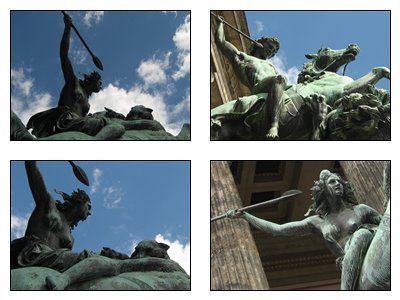
Berlin - Germany - in july 2006 in front of the old museum besides the dom of berlin
This is a first impression of the fine work done by the PictureCutter. It is possible to combine multiple images on one single jpg-file. So you can order the images on photographic paper and cut them into small funny pix.

Get the PictureCutter running

The picturecutter is based on .net 2.0. If you don't have the .net Framework allready you can get it by the Windows Update functionality or directly thru the download here :

Download .net 2.0 Framework from Microsoft

After that you can get latest and Zipped version of the picturecutter here :

2007-01-31 - Release 0.2.0.27

Be patient for more details to the picturecutter... ;-)

Welcome to the PictureCutter Blog

In todays world of digital images it is more and more important to cut out the best of it. So thats what the picturecutter is all about. Cutting out the best. And because the picturecutter is doing just that, the performance is GREAT.

On this Blog you'll find informations about the picturecutter, that little fancy program which is cutting out the best of your images.

This Blog is the second place in the web where the picturecutter comes to the public. The first is the home for developers which you can find here :
http://developer.novell.com/wiki/index.php/picturecutter